Messaging Program
This page is the canonical public reference for the Snuggles SMS messaging program for A2P 10DLC carrier review. It describes the messaging program operated by Snuggles for account authentication, the opt-in flow at the moment of phone-number collection, sample messages, and HELP/STOP behavior. For the legally binding terms, see our SMS Terms and Privacy Policy.
1. About Snuggles
Snuggles is a pet journaling mobile app that lets owners capture and preserve photos, videos, and milestones from their pets' lives. The app is operated by FussionApp, LLC, a U.S. limited-liability company. The brand name that appears in our SMS messages is Snuggles.
Support & contact: support.snuggles@fussion.app
2. Our messaging program
Snuggles operates a single, transactional SMS program. We do not send marketing, promotional, or recurring messages of any kind.
- Message type: One-time password (OTP) verification codes, sent only when a user initiates sign-in.
- Who receives messages: Only individuals who have entered their own mobile phone number into the Snuggles mobile app's sign-in screen and tapped Continue.
- Frequency: One SMS per sign-in attempt. There are no recurring or follow-up messages.
- Geography: United States mobile numbers.
- Carrier & aggregator: Messages are sent via Twilio over standard U.S. mobile carriers.
- Cost: Snuggles does not charge users for SMS. Message and data rates may apply from your carrier.
3. How users opt in (consent flow)
End users opt in by entering their own mobile phone number into the Snuggles mobile app's sign-in screen and tapping Continue. The on-screen disclosure shown at the moment of phone-number collection is reproduced verbatim below the screenshot.
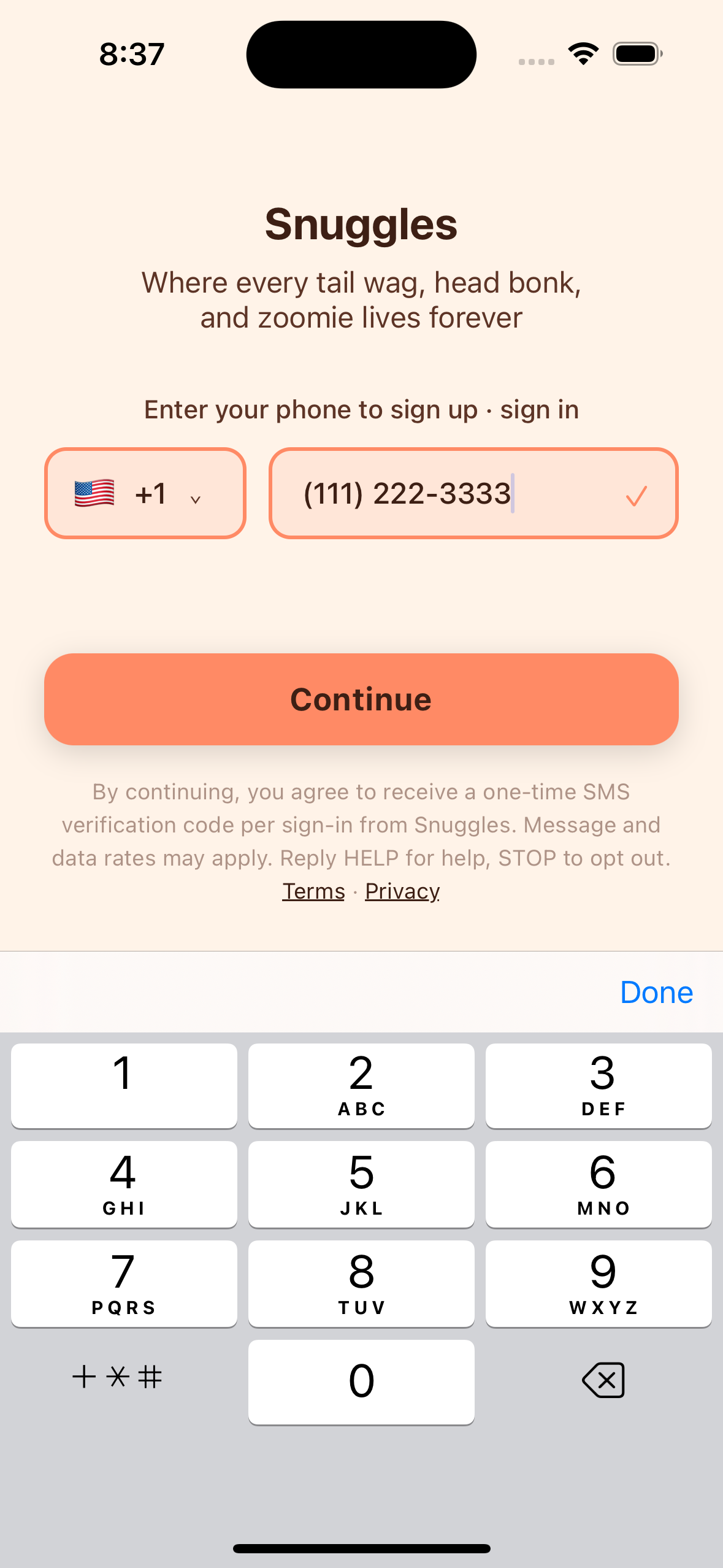
The exact text shown on the sign-in screen at the time the phone number is collected:
Where every tail wag, head bonk, and zoomie lives forever
Enter your phone to sign up · sign in
[country picker] [phone number entry field]
[Continue]
By continuing, you agree to receive a one-time SMS verification code per sign-in from Snuggles. Message and data rates may apply. Reply HELP for help, STOP to opt out. Terms · Privacy
4. Sample SMS
After tapping Continue, the backend sends a single transactional SMS to the number the user just entered, containing only the verification code, in this exact format:
No other automated SMS is sent by Snuggles — no marketing, no reminders, no follow-ups.
5. Verification screen
The user is then taken to a verification screen, where they enter the 6-digit code from the SMS to complete sign-in. The disclosure is repeated:
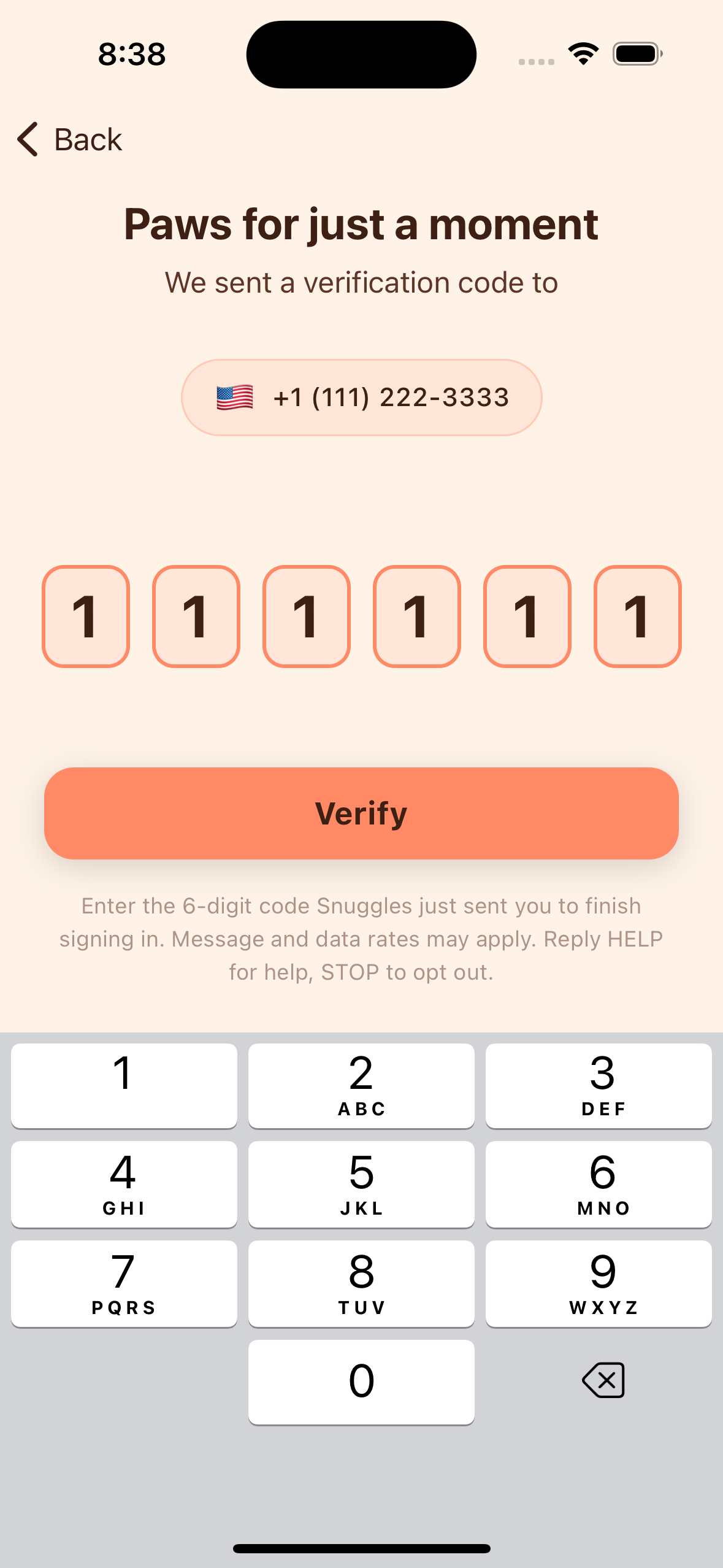
We sent a verification code to [user's phone number]
[6-digit code entry field]
[Verify]
Enter the 6-digit code Snuggles just sent you to finish signing in. Message and data rates may apply. Reply HELP for help, STOP to opt out.
6. Opt-out and help
Opt out: You can stop SMS at any time by replying STOP to any message from Snuggles. You will receive a confirmation SMS and will not receive further verification codes. Without SMS verification you will be unable to sign in; you can re-enable SMS by initiating sign-in again (which re-confirms consent) or by contacting support.
Help: Reply HELP to any message from Snuggles to receive support contact information, or email support.snuggles@fussion.app.
Disclosure (verbatim): Message and data rates may apply. Reply HELP for help, STOP to opt out.
7. Mobile opt-in data handling
Mobile opt-in data — including phone numbers and SMS consent — will not be shared with third parties or affiliates for marketing purposes. Snuggles stores your phone number to authenticate your account and to send the OTP described above. We do not sell, rent, or trade phone numbers. Phone numbers are shared with Twilio, our SMS aggregator, solely to deliver the verification code; Twilio is contractually prohibited from using the number for any other purpose.
Full details of data handling, retention, and your rights are in our Privacy Policy.
8. Linked policies
- Privacy Policy — full description of what we collect, how we use it, who we share it with, retention, and user rights.
- SMS Terms — the legally binding terms governing the SMS program.
- SMS Consent Flow — standalone walkthrough of the opt-in screens.
9. Program summary (for reviewers)
- Brand / program name: Snuggles
- Operator: FussionApp, LLC
- Use case: Account authentication (transactional / OTP only)
- Opt-in method: Web-form-equivalent — user enters their own number on the in-app sign-in screen with disclosure shown at point of collection
- Frequency: One SMS per sign-in attempt
- Sample message: Your Snuggles code is 123456. Valid for 5 minutes.
- HELP / STOP: Supported
- Marketing: None
- Aggregator: Twilio
- Geography: United States